by Dwayne Phillips
A look at the Lenovo Yoga Book. This look concentrates on writing with a pen.
Lenovo may have reinvented the portable computer with their new Yoga Book. A previous post tested the Halo Keyboard for typing. This post examines how the Yoga Book captures handwriting.
The flat plastic panel on the Yoga Book serves as a keyboard and a writing surface. The Yoga Book comes with a pen that Lenovo claims is paired with the computer (you can’t exchange pens). This is nice, but also a pain as I think you should be able to use any old pen or pencil to write. Maybe one day.
The Lenovo’s pen has a changeable tip. You can use a no-ink plastic tip to write on the flat panel and have your writing appear on the screen. That works pretty well for drawing. It doesn’t work well for me for writing.
You can insert a fine-point ballpoint pen tip into the plastic pen to write in ink. You can only use Lenovo pens for this. The computer comes with three ink pens, and you have to order replacements from Lenovo.
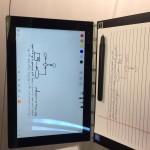
Writing on paper in the horizontal mode. This is the easiest to use.
I include two photographs showing how I wrote on a piece of paper and the writing appeared on the screen in a simple Lenovo-supplied, note-taking application. (Click on the photos to enlarge and see the correct orientation.)
The Yoga Book provides a writing surface that is 8″ by 4″. The “horizontal” writing mode is easiest to use as the 8″ width works nicely with standard 8.5″x11″ paper.
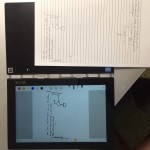
The vertical mode of writing is more difficult to use as the writing surface is only 4″ wide.
The “vertical” mode is more difficult to use. Turned this way, the writing surface is only 4″ wide. That takes some adjusting to use.
The Yoga Book comes with a paper writing pad from Lenovo. It is the size of the writing surface. It is easy to use, but using your own paper is also easy once you adjust to the writing area.
The Lenovo pen works on proximity, not pressure. This is bad in that you have to use Lenovo’s pen—nothing else works. The good part is that you can put a writing pad or a short stack of papers on the writing surface. I used a stack of twenty pieces of paper, and the device worked fine.
The Lenovo note-taking application saves your hand-written notes as a PDF. That seems to work.
I can use this to write notes on paper and not have to scan them. The orientation is a bit clumsy at first, but you become accustomed to it in the first hour.
No other portable computer on the market does this. Will people jump on it? Some who love to write with a pen will. Most of us? I don’t know.
Tags: Computing · Writing
by Dwayne Phillips
I complete yet another certificate program. This time it is in Data Science and from Microsoft and EdX.
I just finished the Microsoft Professional Program in Data Science. This took about 12 weeks and cost me about $500.
The Good:
I learned…
- cool tricks with MS Excel
- how to write SQL queries (an awful “programming language”)
- how to use the MS Azure Machine Learning tool (it has a lot of bugs still)
- some R programming
- I knew a lot about data science already, but we didn’t call it data science when I learned it
- (some) college professors are still good at obfuscation
- never believe anything you see in the media about such-and-such percentage of such-and-such did such-and-such so we all MUST do this and that
The Bad:
- see my post about MOOCs
- They use many non-English speakers to lecture. It is difficult to understand what they are saying.
- fuzzy screens shots
- lots of busy work that has nothing to do with the subject at hand
- general laziness in the production and presentation
- Microsoft won’t officially recognize completion of the program until January 2017
The Ugly:
Customer service is very bad.
Me: I have a question
Answer: ask someone else
The learning program is a partnership of EdX.org and Microsoft. No one claims responsibility for the product. Ask EdX a question, and they tell you to ask Microsoft. Ask Microsoft, and they tell you to ask EdX. Ask an instructor, and they tell you to ask other students on the discussion board.
Conclusion: I made it through to the end. I have yet another certificate. Maybe it might mean something to some potential employer.
Tags: Certification · Education · Learning · MOOC
by Dwayne Phillips
A look at the Lenovo Yoga Book. This look concentrates on typing on the Halo Keyboard. Next up, let’s try writing with a pen.
Lenovo may have reinvented the portable computer. We’ve come a long way since the days of the KayPro CPM lug-able computer. Lenovo’s Yoga book is thin. See the first photo showing the thickness compared to an Apple MacBook Air and a paper Moleskin notebook (sorry for the orientation).

The Lenovo Yoga Book between an Apple MacBook Air and a Moleskine notebook
The key to the thin computer is the keyboard. Lenovo calls it their Halo Keyboard. It is a flat black piece of material. When activated, keys illuminate. (see second photo).

The Lenovo Yoga Book showing the illuminated Halo Keyboard
This is a fascinating piece of hardware. There are no ridges on the edges of the “keys” or any physical features to let you know that your fingers are on or off the keys.
Flat. Thin. Great.
But can you type on it? Because if you can’t type on it, you might as well toss it away and use the basic tablet virtual keyboard, which I despise as a writer.
Typing Test: Out of the box, I went online and did one of those typing speed tests. I scored 35 words per minute. I then took a test on the same web site on my usual Apple keyboard and scored 65 words per minute. The Halo Keyboard fails out of the box.
Let’s practice a little. After a couple of days of a few practice sessions (about an hour total), I increased my typing score to 50 words per minute on the Lenovo Yoga Book. I have to pay attention, especially to the pinky finger on the left hand (where is the “a”?).
The Halo Keyboard provides good feedback. The obvious feedback is sound. You can be quite annoying to everyone else in the coffee shop by adjusting the sound to 11 and hearing a beep on every touch of the keyboard. The ingenious feature of the Halo Keyboard is the tactile feedback—the entire flat panel vibrates to let you know you have pressed it with enough force to register a keystroke. That works well for me.
Conclusion part 0.1: The Lenovo Yoga Book is the smallest, thinnest, adequate writing machine I have ever touched. The iPad and other tablets work, but with a separate bluetooth keyboard.
The Yoga Book works, and it is practically thin as opposed to thin and theory and thick in practice.
All the Lenovo details are on their web site.
Tags: Computing · Technology
by Dwayne Phillips
Take care with jokes at work. A “manager” may hear the joke, take it seriously, and make it a policy.
This isn’t a Dilbert cartoon; it is a true story that happened to me some 20 years ago.
I found a little book of performance appraisal phrases. I found it to be hilarious. Who could possibly use these phrases in an actual, written performance appraisal? We tossed it around the back room at work and had lots of fun with it.
I made the grave mistake of leaving it on my desk one evening. A senior manager happened to walk through my work area after I had left for the evening. He saw the little book, took it seriously, ordered several dozen copies, and thereafter required all performance appraisers to use it in their performance appraisals.
A joke became an official policy.
To all those who came after me in that organization, I extend my sincerest apology. I thought it was funny. I never thought you would be punished with the joke.
To all those senior managers who can’t tell when a joke is a joke, well, I don’t know what to say.
Tags: Work
by Dwayne Phillips
If you are a successful college professor, and someone asks you to turn your course into a MOOC, proceed with great care. These things are not the same.
I am currently taking a series of online courses or MOOCs (Massive Open Online Course or is it Massive Online Open Course or is it Massive Opportunity to make Outrageous amounts of Cash?). I am not having a good experience. There are opportunities to learn, and I am learning. There is also, however, great disappointment.
The lectures are sloppy. Some lectures are difficult to understand as the speakers are not native English speakers. Many visuals shown are fuzzy and illegible. The lecturers don’t answer questions.
I caution successful college professors from doing a MOOC. I feel that these persons who come across poorly in the MOOCs are excellent professors and succeed at both research and teaching—in a campus environment.
Specific cautions:
You can’t show slides and just talk as if you were in a classroom. That comes across as sloppy, and the grammar, once transcribed and shown on the screen next to the video, is embarrassing.
Don’t let the production company show your presentation without your final, absolute approval. They will put up any out-of-focus junk to save time and money.
Have a firm agreement on who will answer questions from paying customers. You may need to spend 28 hours a day answering questions. You can’t do that. Hence, you ignore most questions and give poor answers to the rest. You come across as (hmmm, how to say this?) a jerk.
MOOC is not college. MOOC deals with professionals in the workforce. They invest time and money and expect excellence. They are not 18-year-old freshmen who need to be “weeded out” with quips and suggestions to ask another student. And you don’t have a staff of grad students to take care of these things.
Excellent material can be presented in an excellent manner in a MOOC. The MOOC can also present an excellent professor as a bungling, heartless hack. Proceed with caution and feel no fear in marking up the contract.
Tags: Education · Learning · MOOC
by Dwayne Phillips
I am not a reporter asking a political candidate a question. I actually expect the other person to hear and answer the question I ask. What is wrong with me?
I am currently taking a series on online classes. I ask questions in these classes. I am paying for these classes. I expect someone to answer me. The key point is:
I expect someone to answer the question I asked. Not some other question.
I suppose there is something wrong with me. I strongly suspect there is something wrong with my expectations. After a dozen tries, no one has answered any question I asked.
Let’s step outside the online classes and move back into some semblance of real life. I am on some sort of losing streak in my life when it comes to asking questions. I think long and hard on how to word my question. I ask it as plainly as I can. The other person comes back with a discussion of how to make yogurt or some other off-the-wall subject.
Tip: ask the other person to repeat back what question they heard.
Most other persons find this quite annoying and often huff and walk away.
Other tips are welcome. First tip, “Change my expectations.”
Now to the other side. What question did the other person ask me? Something inside me screams that I should pay attention and try to answer the question instead of changing the subject to making yogurt.
Tags: Communication · Questions
by Dwayne Phillips
While I sip my morning coffee, I’m using a computer that is somewhere else, run by someone else, and paid for my someone else.
I am taking a data science course online. As part of the course, I have some weeks of limited, free time on a machine leaning platform that is “in the cloud,” i.e., in a data center somewhere.
I sit in front of my puny 11″ screen adjusting the coefficients on a machine learning algorithm (sounds much more impressive than it is). I hit the enter key, and viola, magic happens somewhere.
I’m not paying for this computing time. Someone is, someone has to be, someone must be, but it isn’t me. What is happening here in the 21st century?
Oh, by the way. One of the limitations is that I can only submit three runs per day. That takes me back to the days of punch cards, computing I/O rooms, and turnaround that is so slow that I could only run three programs a day.
Well, maybe this clouded supercomputing century isn’t all that it is made to be?
Tags: Computing
by Dwayne Phillips
One indication of a bad design are lots of instructions on how to do a simple task.
I live in Reston, Virginia. We have an (somewhat or other) urban core or something called the Reston Town Center. It has parking garages. The management company, to the consternation or many locals, has decided to charge for parking in all the parking garages.
Paid parking garages have existed in the US for decades. I thought the companies had it all figured out. I was wrong.
I came into the Reston Town Center as I usually do on a Saturday morning to drink coffee, view the Internet, and write some blog posts. I was confronted with a dozen signs instructing me how to park my car.
Parking a car is pretty simple. People have been parking cars since cars were invented over a hundred years ago. Yes, some people park poorly, but the vast majority of the time the vast majority of people park their cars adequately.
Question: Why do I need a dozen signs telling me how to park my car?
Answer: Bad design.
One of the best little books on design I have ever read is that by Don Norman. One of his chapters discusses how some designs are so bad that the implementers have to put signs everywhere telling users how to do something simple. Examples include doors that have instructions on how to open them and faucets that have instructions on how to make water flow.
Well, let’s add paid parking at the Reston Town Center. We need a dozen signs so we know how to park a car.
Tags: Design
September 29th, 2016 · No Comments
by Dwayne Phillips
I won’t hear my old neighbor’s voice anymore. Vin Scully retires.
It was 40-something years ago. I was a kid playing in the back yard in southern California. I played to the music of Vin Scully describing Dodger baseball games.
I never saw our neighbor—Mr. Garcia. He had erected some sort of bamboo curtain along the fence so that we couldn’t see him as he toiled on this and that in his backyard. I always heard him. He had his AM radio blasting the Dodgers games six months a year. His radio was too loud as you could hear it several backyards away. No one complained about the noise because it wasn’t noise. It was Vin Scully.
Vin Scully was the sound of baseball. This was the 1970s, and America’s youth—all of it— played baseball. Vin Scully floated through the neighborhood.
As a kid, I thought all baseball announcers sounded like Vin Scully. It was one of the terrible disappointments of the transition from youth to adult that I learned how Vin Scully was the exception to the rule. How did the rest of America grow up without his voice?
Our neighbor, Mr. Garcia, treated the neighborhood to Vin Scully. Our neighbors shared the sound of a distant neighbor chatting at a baseball game. Vin Scully was our neighborhood even though he was a Chavez Ravine some hundred miles away.
Vin Scully retired. The world will be a little less neighborly.
Tags: Communication
September 26th, 2016 · No Comments
by Dwayne Phillips
What could possibly go wrong with moving all your development to the cloud? At least ask the question.
Programmers are running to cloud-based integrated development environments (IDEs). Once again, consumers run away from bad services, in this case the IT department, and towards better services, in this case cloud providers.
This comes with risks, and I don’t see many people acknowledging those risks.
Recently, I was taking a cloud-based course, a.k.a., online learning or MOOC. I was completing a graded, you-need-to-pass-this-to-get-your-money’s-worth test. My Internet connection failed (thanks Xfinity). I was fortunate in that I eventually recovered and didn’t lose my tuition fee. It was only $49. Programmers, and their employers, are often at risk for much more than $49.
Moving to cloud-based development? Good for you. I hope it all works fine. Still, do some risk management and ask,
What could possibly go wrong?
Tags: Programming · Risk



